
Open Salaah times in the left-hand menu, then Ramadan underneath it. Nothing here replaces your ordinary timetable - your imported or calculated times stay the source of truth all month. Ramadan mode changes how those times are presented and adds Taraweeh on top.
Turn Ramadan mode on #
The Ramadan mode toggle sits at the top right of the page. Switching it on does not change anything today - it arms the whole setup so it applies itself on day 1 of Ramadan, across every screen you have paired, with nothing for anyone to remember on the night. Ramadan is confirmed by moon sighting in Sidrah, just as Eid is, and it follows the Hijri adjustment you set on the Salaah times page.
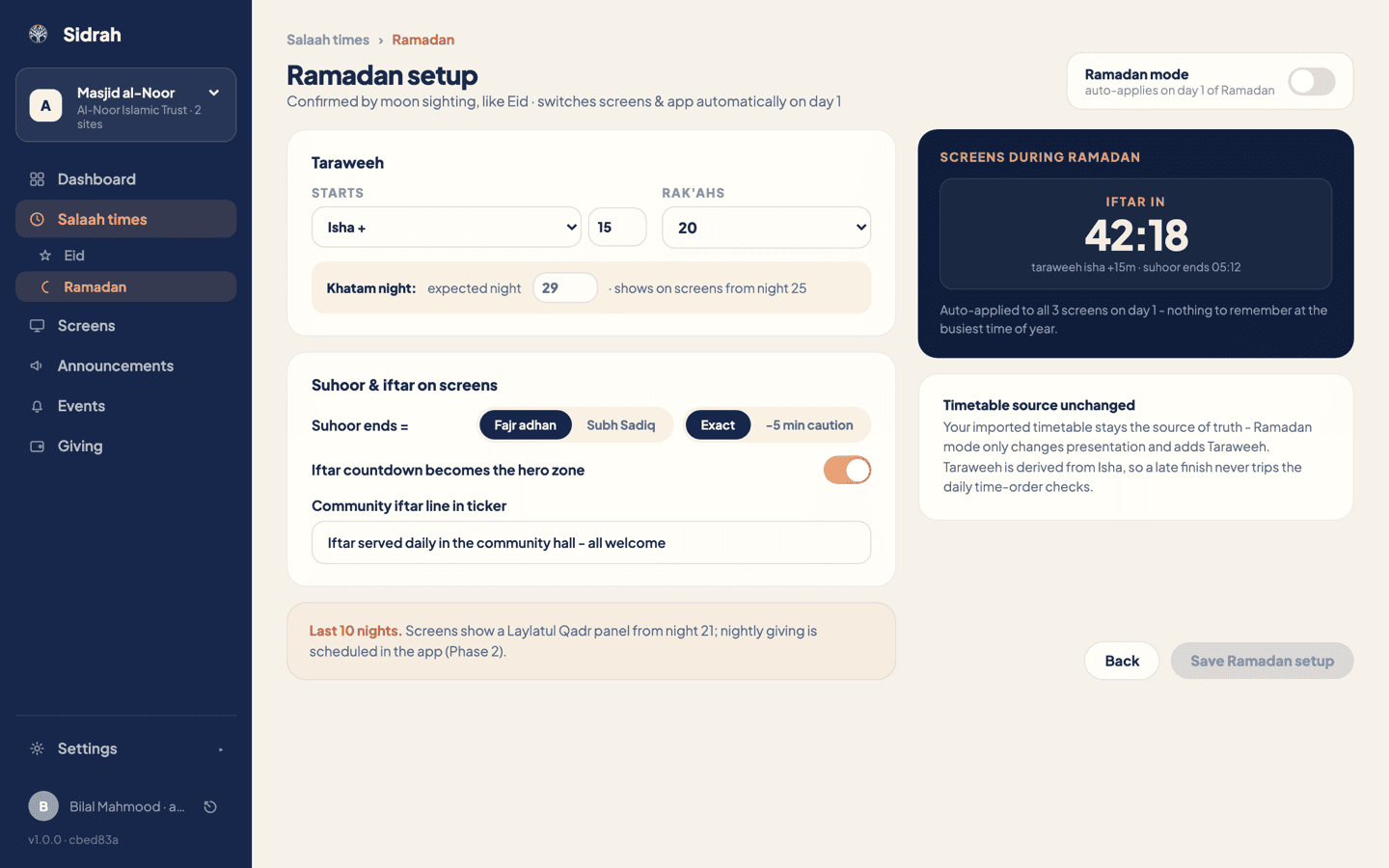
Set your Taraweeh #
Under Starts, choose how Taraweeh is timed:
- Isha + a number of minutes - Taraweeh follows Isha through the month as the nights draw in. This is what most masaajid want.
- Fixed - a clock time that does not move, for masaajid who advertise the same start every night.
Then pick Rak'ahs: 8, 10 or 20. Underneath, set the Khatam night you expect the Qur'an to be completed on. Your screens start advertising it from night 25, which gives people time to plan to come.
Because Taraweeh is derived from Isha rather than typed in as another salaah, a late finish will never trip the daily time-order checks on your ordinary timetable.
Decide when suhoor ends #
This is the setting people ask about most, so it is worth a moment's thought. Suhoor ends = offers two sources:
- Fajr adhan - suhoor ends at the Fajr adhan time already on your timetable. Simple, and consistent with your printed sheet.
- Subh Sadiq - true dawn, calculated at eighteen degrees for your exact location.
Then choose Exact or -5 min caution, which shows the time five minutes early so nobody is caught out by a slow kettle.
Subh Sadiq stays greyed out until your masjid has a map pin, because true dawn cannot be worked out without coordinates. If you need it, set the location first - see your masjid profile - then come back and the option will be selectable.
Put iftar front and centre #
Switch on Iftar countdown becomes the hero zone and the biggest area of your screens turns into a live countdown to Maghrib for the whole month, with the Taraweeh start and the suhoor end sitting underneath it. You can see exactly what that looks like in the preview panel on the right of the page.
If you serve food, type a line into Community iftar line in ticker - something like "Iftar served daily in the community hall, all welcome". It runs along the ticker on every screen for the month, so you do not need to post an announcement about it every week.
From night 21, screens also show a Laylatul Qadr panel automatically. There is nothing to switch on for that.
Save, then check the preview #
Press Save Ramadan setup. The button only comes alive once you have changed something, so if it looks inactive you are already saved.
Now read the navy panel on the right. It counts your paired screens back to you and shows the iftar countdown with your Taraweeh time and suhoor end underneath, exactly as the hall will see it. If that panel looks right, you are done - go and do something more useful with your Ramadan.