
Gift Aid is for UK registered charities only. The Gift Aid panels appear on the Giving page only when your organisation holds a UK charity number, and you need the org Owner or Finance role to see the Giving page at all. If your trust is registered but the panels are missing, email us and we will check the charity number on your organisation record.
Sidrah prepares the schedule; your charity makes the claim. We keep the declarations, do the arithmetic and build a CSV in the shape HMRC's charitable-giving schedule expects. Filing it, and everything that follows from filing it, stays with your charity and its own advisers. Nothing here is tax advice, and the responsibility for what you submit remains yours.
Understand where declarations come from #
You do not chase declarations. When somebody donates through Sidrah, the checkout asks whether they want to add Gift Aid and takes their declaration and details there and then. A donation with a declaration attached carries a teal Gift Aid badge in the donations list; one without simply shows a dash.
The 25% is the basic-rate tax the donor already paid on that money, reclaimed by your charity: a £100 donation with a declaration is worth £125 to the masjid. It costs the donor nothing extra, which is worth saying plainly in a khutbah or on a poster, because plenty of regular givers have never ticked the box.
Read the claimable panel #
Open Giving and scroll to Gift Aid claims. Two figures sit at the top:
- Claimable now - the 25% uplift on every declared donation that is not yet part of a claim.
- Unclaimed donations - how many donations that figure is made of.
Both are live, and both count only donations that have not already been swept into a claim, so the number never double-counts. The same figure appears as a stat tile on the organisation overview.
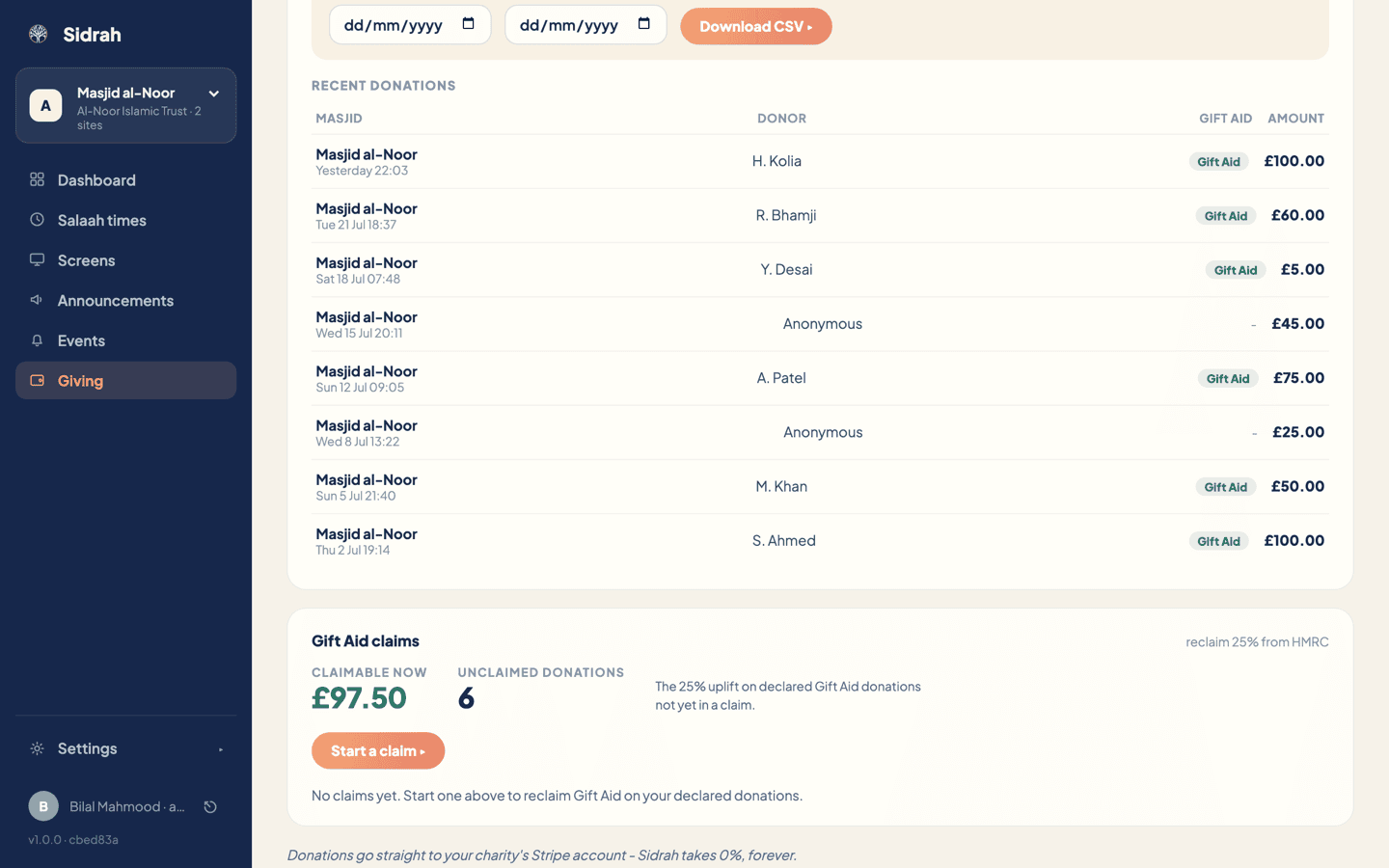
Just above the claims panel there is also a standalone Gift Aid claim (HMRC CSV) box with From and To dates and a Download CSV button. Use that when you only want to look at a period, or to give your accountant a copy; leave the dates blank for year-to-date. It exports the schedule without starting a claim or marking anything as claimed.
Start a claim #
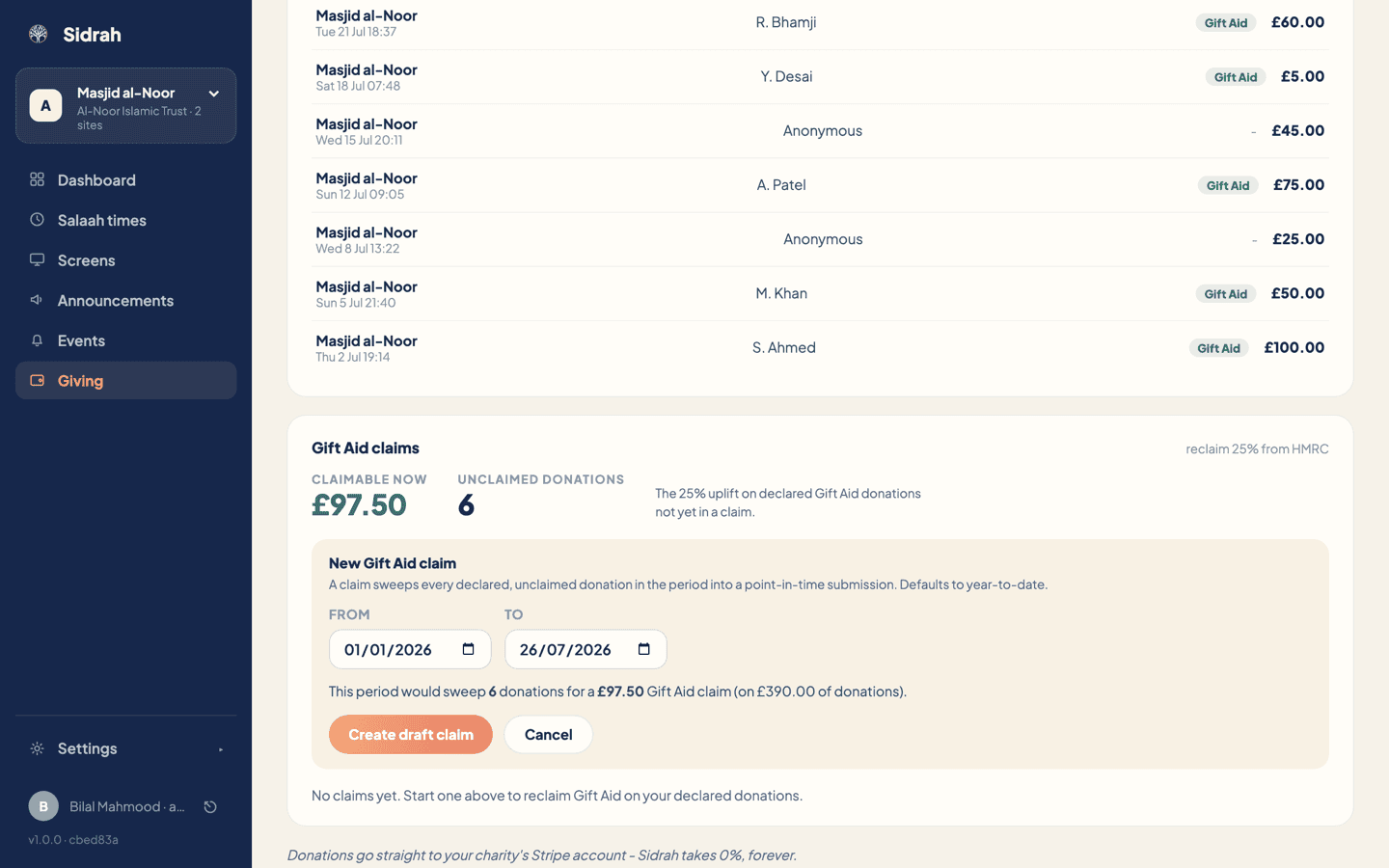
Click Start a claim. The New Gift Aid claim box opens with a suggested period already filled in, running from the start of the year to today, and tells you what that period would sweep up: how many donations, the total given, and the claim they add up to.
Narrow the From and To dates if you would rather claim a quarter at a time, then click Create draft claim. A claim takes every declared, unclaimed donation inside the period and fixes them into a point-in-time submission, so the totals stop moving even as new donations keep arriving. Anything outside the period stays where it is, waiting for the next claim.
If there is nothing to claim, the button is unavailable and the panel says so rather than offering you an empty claim.
Download the schedule and file it with HMRC #
Your new claim appears in the Claims list as a draft, labelled with its period and carrying the claim amount, the number of donations and the total given. A draft offers two actions:
- Download CSV - the schedule for that claim, formatted for HMRC's charitable-giving schedule and named after the claim, ready to upload through your charity's own HMRC account.
- Mark as submitted - the record that you have filed it. Sidrah asks you to confirm, because it locks the claim.
Do them in that order: download, upload to HMRC, and only then mark it as submitted. Marking a claim submitted locks its totals and keeps its donations counted as claimed, which is exactly what stops them being claimed twice.
Check it worked #
A submitted claim becomes a locked row with a teal Submitted badge and the date you filed it. Its buttons are gone, because there is nothing left to do to it.
At the same time, Claimable now drops by the amount you have just claimed - often to zero if you swept everything - and starts building again as new declared donations come in. That is your running to-do list: when it grows to a figure worth the ten minutes, start the next claim.
Claim on a rhythm rather than when someone remembers - quarterly suits most masaajid. Keep the downloaded CSVs with your charity's records: they are the schedule you filed, exactly as you filed it.